
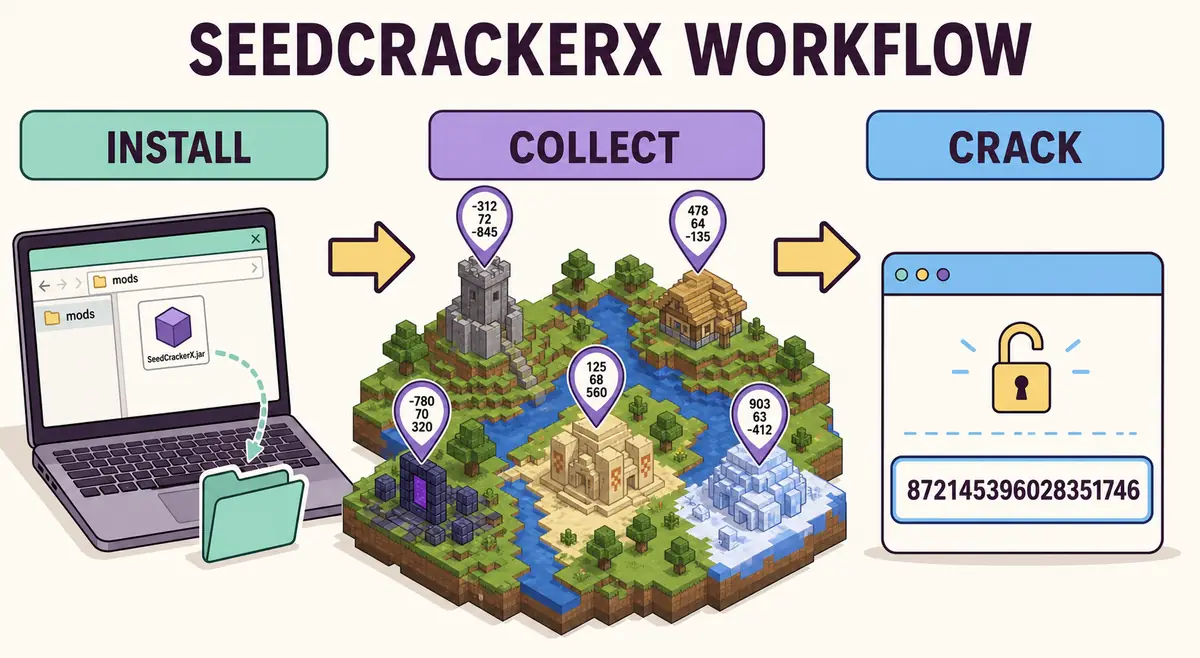
Install SeedCrackerX in the correct Fabric instance
Start by matching the launcher profile, Minecraft version, Fabric Loader, and SeedCrackerX JAR.
Choose the exact Minecraft release in the version finder. Minecraft 26.1.2 maps to SeedCrackerX 2.16.0, while Minecraft 1.21.11 maps to 2.15.6. Download only the matching asset from the official 19MisterX98 GitHub release.
Install Fabric Loader for that release, locate the active instance, and place the unextracted JAR in its mods folder. Remove duplicate SeedCrackerX versions and keep Forge or NeoForge mods in separate profiles.
SeedCrackerX is a Minecraft Java Edition client-side Mod for Fabric, not a server plugin. Launch the Fabric profile in a test world and run /seedcracker gui. An unknown command means the mod did not register; check the launcher log, instance path, loader version, Minecraft range, and dependencies.
- Back up the launcher instance before replacing a working mod set.
- Use only the official release asset for the selected Minecraft version.
- Confirm the Fabric profile appears in the launcher before starting the game.
- Keep one SeedCrackerX JAR in the active mods folder.
- Verify the GUI command in a permitted test world before multiplayer use.
Understand what the mod is collecting
SeedCrackerX does not request the plain world seed from a server. It reconstructs the seed from deterministic world-generation evidence.
When the client receives a chunk, enabled finders scan local information such as block templates, structure pieces, chest orientation, dimension, and biome. A successful finder converts the observed structure into versioned feature data containing chunk or region coordinates and the feature's generation rules. The data store removes duplicates, estimates information, and schedules the appropriate TimeMachine search phase.
End pillars provide a special 16-bit clue. Structure observations constrain the lower 48-bit structure seed. A server-provided hashed seed, eligible decorators, or biome observations can then help recover the remaining upper bits of the 64-bit world seed. This staged design explains why seeing one structure is not the same as having enough independent information to return a unique result.
Configure the world version and finder set
The configured version controls structure spacing, salts, biome behavior, and other tests used against candidate seeds.
Open /seedcracker gui and select the version that generated the world, which may differ from a proxy's accepted protocol. SeedCrackerX must model the server's real world generation. Clear incompatible observations if you change this setting after collection.
Modern defaults enable major structures, End pillars, dungeons, and Trial Chambers. Legacy or situational finders such as End gateways, emerald ore, desert wells, warped fungus, and biome sampling stay disabled unless the current workflow needs them.
Rendering is separate from collection. Use outlines to confirm recognition, disable them if performance suffers, and run /seedcracker finder reload after changing finders to rescan nearby chunks.
Collect varied structures on Minecraft 1.18 and newer
Modern cracking usually needs about 32 normal bits and 40 liftable bits, not a universal fixed number of structures.
Liftable structures include igloos, pyramids, jungle temples, swamp huts, shipwrecks, and pillager outposts. Monuments, Trial Chambers, End Cities, buried treasure, and other supported structures can add normal data. Every observation must be detected by the mod, not copied from an external map.
Use a mixed route, run /seedcracker data bits after detections, and treat the calculator as a planning estimate. If normal data is sufficient but lifting data is low, prioritize a liftable structure rather than another normal-only constraint.
A search can still request more structures when candidates survive. Explore new chunks, prefer independent structure types, and clear data before switching worlds so coordinates from different seeds never mix.
| Observation | What it contributes | How to verify |
|---|---|---|
| Igloo, pyramid, temple, hut | Normal and liftable placement data | Finder outline and changed bit total |
| Shipwreck | Normal and liftable data with template checks | Detected chest/layout and changed bit total |
| Pillager outpost | Liftable planning data | Finder outline and lifting total |
| Ocean monument | Normal reduction support | Finder outline and normal total |
| End pillars | Candidate pillar seeds | Visit the End center after enough pillar chunks load |
| Biomes | Upper-bit world-seed filtering | Enable only when requested by the search stage |
Wait for structure-seed and world-seed reduction
Heavy search stages run on background worker threads and can take time even after the displayed threshold is reached.
The pillar route tests 65,536 pillar seeds, then uses normal structure data to search partial seeds across worker threads. The lifting route filters lower bits from structure offsets before validating complete candidates. This computation is why SeedCrackerX is not a simple web form.
After structure seeds are available, a server hash, eligible decorators, or biome samples constrain the upper bits of the world seed. Biome filtering may fall back to a deeper 65,536-value scan when the candidate set is small enough.
Do not clear data during an active search unless you intend to cancel it. Watch chat and logs for progress, requests for more evidence, failed reductions, or the final clickable world seed.
Troubleshoot missing data or zero candidates
Separate installation, recognition, threshold, and candidate failures instead of changing every setting at once.
Missing commands point to Fabric installation. Missing detections point to the global cracker, finder state, loaded chunks, template support, or configured version. If bits increase but no search starts, compare both thresholds and check whether the route also needs End pillars. Zero candidates usually indicate a wrong version, false detection, mixed-world data, or outdated finder.
Use debug mode only long enough to capture the failing phase. Clear data after fixing a wrong version or mixed-world observations, and do not enable legacy routes without checking their release limits and server rules.
- Unknown command: inspect Fabric and instance installation.
- No outline: inspect finder, dimension, chunks, template, and configured version.
- Bits do not change: confirm the structure was newly accepted rather than duplicated.
- No candidate: clear incorrect or cross-world data and collect again.
- Many candidates: add another independent structure, hash, decorator, or requested biome clue.
Unknown command
Symptom: /seedcracker gui or another current command returns Unknown command. This is an installation or command-tree problem, not evidence that a server has blocked the calculation.
Possible reason: SeedCrackerX is a Minecraft Java Edition client-side Mod for Fabric. The active launcher profile may be vanilla, Forge, NeoForge, or a different instance, the JAR may target another Minecraft range, or an older build may document the legacy /seed prefix.
Check: Confirm the Java Edition Fabric profile, the active instance's mods folder, one matching JAR, Fabric Loader log, Minecraft version, and required dependencies. A client can load the mod without the server installing it, but client installation does not mean that the server allows its use. Compare the file with the official releases.
Recommended command: Run /seedcracker gui after starting the intended Fabric profile. For a pre-2.13.1 build, check that build's documentation for /seed gui instead of mixing command prefixes.
Next action: Remove the incompatible or duplicate JAR, install the release matching the world-generation version, restart the same instance, and verify the GUI in a permitted test world. If the current command tree still fails, capture the relevant Fabric log and consult the official issue tracker without assuming every unknown-command report is a project-wide bug.
No structure outline
Symptom: You enter a supported-looking structure's chunks, but no colored outline appears and the structure is not reflected in the data. This is a common form of SeedCrackerX not working, but the missing outline alone does not identify the cause.
Possible reason: The global cracker or relevant finder is off, outline rendering is disabled, chunks are not loaded, the dimension or generation version is wrong, or the observed blocks do not match the release's supported template. Custom world generation and server-side changes can also prevent recognition.
Check: Open /seedcracker gui and verify the current Minecraft version, dimension, cracker state, finder category, and outline setting. Stand in the active world until the relevant chunks load, then confirm that the building was detected by the mod rather than copied from a map. Finder collection and outline rendering are separate settings.
Recommended command: After correcting the finder settings, run /seedcracker finder reload to rescan currently loaded chunks, then use /seedcracker data bits to see whether accepted data changed.
Next action: If the outline remains absent, test one fresh supported structure in the same permitted world and record the configured version, dimension, finder, and log details. Report a reproducible case through the official issues; do not promise that a custom generator or every server setup is compatible.
Normal bits are enough, but liftable bits are short
Symptom: /seedcracker data bits shows enough normal information for the ordinary route, while the liftable total is still below the level you expected. The two values are not one combined score.
Possible reason: Normal and liftable bits measure different constraints. A normal-only structure, a duplicate observation, a rejected template, or a rounded browser estimate can increase the wrong total or add less information than expected. The calculator is for planning; the installed mod's output is the authority.
Check: Read both lines from /seedcracker data bits, confirm the finder outline and accepted structure type, and verify the Minecraft version, dimension, and world are unchanged. Do not combine observations from another world or use a map coordinate as proof of a current detection.
Recommended command: Run /seedcracker data bits after each newly accepted structure and /seedcracker finder reload only after changing finders or scanning settings.
Next action: Search for a compatible liftable structure such as an igloo, pyramid, jungle temple, swamp hut, shipwreck, or pillager outpost instead of collecting another normal-only structure. Compare the plan with the structure bit calculator and the liftable-structures guide, then follow any new request from the mod.
The search shows no results immediately
Symptom: The search returns no results or zero candidates as soon as a search stage begins, even though one or more structures were detected.
Possible reason: The configured generation version, dimension, or structure template does not match the current world; a false detection, mixed-world observation, incompatible restore, or stale data can make the constraints contradictory. The message alone is not confirmation of a universal release bug.
Check: Compare the active world and dimension with every recorded observation, verify the exact Minecraft generation version, review recent restored data, and check both normal and liftable totals. Use the log to identify the failing phase before changing multiple settings.
Recommended command: After identifying invalid observations, run /seedcracker data clear, reconnect if the server or dimension changed, collect fresh evidence, and use /seedcracker cracker debug ON briefly if the failure needs a log trace.
Next action: Rebuild the dataset from newly detected structures in the same permitted world and then compare the sanitized log with the official issues. Do not keep adding structures to a dataset already known to mix versions or worlds.
The search keeps running
Symptom: A search remains active for a long time, the candidate count changes slowly, or the client appears busy after the displayed bits threshold is reached.
Possible reason: Pillar, lifting, biome, or world-seed stages can be computationally heavy; candidate count, hardware, data quality, and the requested route affect duration. Reaching an approximate threshold does not guarantee a unique seed or an immediate finish.
Check: Read chat and logs for progress or a request for another structure, run /seedcracker data bits only when the client is responsive, and verify that the active search is not waiting for biome, hash, pillar, or additional structure evidence. Do not infer success or failure from elapsed time alone.
Recommended command: Use /seedcracker cracker debug ON for one reproducible run when a phase is unclear; turn it off after capturing the relevant output. Do not use /seedcracker data clear during an active search unless cancellation is intentional.
Next action: Let the current phase finish when possible, or collect the exact evidence requested by the mod in the same world. If it repeatedly stalls with a reproducible setup, share version, dimension, data summary, sanitized logs, and the release link in the official issue tracker; no fixed completion time is guaranteed.
The crack cannot finish on a Paper server
Symptom: The Fabric client loads, but structure detection, data collection, or the final search does not complete on a Paper server. A client-side command working is not proof that the server's world data is compatible.
Possible reason: Paper configuration, plugins, proxy behavior, custom world generators, anti-xray, or changed server-side generation can alter or hide the evidence the client receives. SeedCrackerX is a Java Fabric client Mod; it does not turn a Paper server into a supported vanilla generation environment, and no compatibility guarantee applies to every Paper or anti-cheat setup.
Check: Confirm the actual world-generation version and dimension, ask the operator whether analysis is allowed, compare a permitted local or vanilla test world, and inspect whether chunks expose the templates the finder expects. Separate server rules from technical symptoms and do not attempt to bypass anti-cheat or access controls.
Recommended command: Run /seedcracker data bits to record accepted data and use /seedcracker cracker debug ON for a short sanitized trace. No command can guarantee compatibility or make a server allow the mod.
Next action: Stop if the operator does not permit analysis, or ask for a supported test context and exact server details. For a reproducible permitted case, consult the official issues with the Paper/plugin/version facts; do not describe one server report as a confirmed universal bug.
Candidates look wrong after switching worlds
Symptom: The candidate list, bits, or search request looks implausible after moving to another single-player world, server, dimension, or generation version.
Possible reason: Old observations, candidate state, hash context, or saved coordinates remain in the active client while new chunks are being scanned. Minecraft version, dimension, and world data are separate inputs and must not be mixed.
Check: Identify the exact current world/server, dimension, configured generation version, and time of every observation. Treat any data collected before the switch as suspect, and do not use a browser calculator or restore file to bridge two worlds.
Recommended command: Run /seedcracker data clear before collecting in the new context, then use /seedcracker gui to verify the version and finder settings. Use /seedcracker data bits only after fresh detections.
Next action: Reconnect when the server or dimension changed, keep notes separated by world and release, and recollect only from the current permitted world. If a clean reproduction still produces anomalous candidates, use /seedcracker cracker debug ON and compare the sanitized evidence with the official issue tracker.
Restored data produces an incorrect result
Symptom: After /seedcracker data restore, the bits or candidate result is inconsistent with the current world, or the restored search returns no candidates.
Possible reason: Restore reuses saved structure entries; it cannot prove that the entries came from the current world. A different server address, dimension, Minecraft generation version, structure template, or partially corrupted record can make valid-looking coordinates invalid here.
Check: Verify the saved file's world/server context, structure names, chunk coordinates, dimension, configured version, and release. Compare the restored state with /seedcracker data bits and keep restored data separate from newly detected observations until it is validated.
Recommended command: If the source is not exactly compatible, run /seedcracker data clear and collect again. Use /seedcracker data restore only for records from the same world and compatible generation, and enable /seedcracker cracker debug ON briefly when diagnosing a reproducible mismatch.
Next action: Remove cross-world or wrong-version records from the workflow, rebuild from current detections, and submit only sanitized reproduction details to the official issues. A restore failure does not by itself establish that the release is broken.
How to use SeedCrackerX safely on multiplayer
Knowing how to use SeedCrackerX safely starts with permission and clear server rules.
Use the mod in single-player worlds, your own servers, research environments, or multiplayer worlds where seed analysis is permitted. Review the optional database submission behavior before enabling it. SeedCracker Guide does not query that database or receive structure selections from browser tools.